Gumps
A gump is an in-game window with custom contents, assembled from a set of gump elements (buttons, text, checkboxes, pictures, and so on). Gumps are built and sent by the server; the client only renders them and sends back the player’s response.
A gump can be as simple as a window with one line of text and two buttons (“Yes” / “No”), or as complex as a multi-page interface with hundreds of elements — quest logs, vendor menus, anti-macro challenges, character configuration screens, and more.
From a script’s point of view, a gump is incoming data you read and respond to: you detect that a gump appeared, identify which gump it is, read what it contains, optionally fill in fields, and press a button (which sends the response back to the server).
Гамп — это внутриигровое окно с произвольным содержимым, собранное из набора элементов гампа (кнопки, текст, чекбоксы, картинки и т.д.). Гампы формирует и присылает сервер; клиент лишь отрисовывает их и отправляет назад ответ игрока.
Гамп может быть простым — окно с одной строкой текста и кнопками «Yes» / «No», — или очень сложным: многостраничный интерфейс с сотнями элементов (журналы квестов, меню торговцев, антимакро-проверки, экраны настройки персонажа и т.п.).
С точки зрения скрипта гамп — это входящие данные, которые вы читаете и на которые отвечаете: вы обнаруживаете появление гампа, определяете, что это за гамп, читаете его содержимое, при необходимости заполняете поля и нажимаете кнопку (что отправляет ответ серверу).
When the server sends a gump, it arrives as one of two packets:
0xB0— an uncompressed (“simple”) gump (older format).0xDD— a zlib-compressed gump (the modern format used by most current shards).
Both carry the same logical content. Stealth decompresses (if needed), parses the gump into a structured form, and stores it in a per-character gump list. Your script works against that parsed list — you never deal with the raw packet.
Когда сервер присылает гамп, он приходит одним из двух пакетов:
0xB0— несжатый («простой») гамп (старый формат).0xDD— гамп, сжатый zlib (современный формат, используемый большинством актуальных шардов).
Оба несут одно и то же логическое содержимое. Stealth распаковывает (если нужно), разбирает гамп в структурированный вид и сохраняет его в списке гампов персонажа. Скрипт работает с этим разобранным списком — с сырым пакетом вы не имеете дела.
This is the single most important concept when scripting gumps. A gump is addressed in three different ways, and mixing them up is the most common mistake:
| Term | What it is | Stable? |
|---|---|---|
| Index | The position of the gump in Stealth’s gump list (0-based). GetGumpsCount - 1 is the newest gump. |
No — shifts as gumps open/close. |
| GumpID | The gump’s type/layout identifier sent by the server. | Depends on shard — may be unique per gump type, not guaranteed. |
| Serial | The serial number sent with the gump (often the source object). | Depends on shard — may be unique, not guaranteed. |
Most API methods that read or interact with a gump take an index (NumGumpButton, GetGumpInfo, CloseSimpleGump, …). You typically obtain that index by scanning the list and matching on GumpID and/or Serial.
Это самое важное понятие при скриптинге гампов. К гампу обращаются тремя разными способами, и их путаница — самая частая ошибка:
| Термин | Что это | Стабилен? |
|---|---|---|
| Index (индекс) | Позиция гампа в списке гампов Stealth (с 0). GetGumpsCount - 1 — самый новый гамп. |
Нет — смещается при открытии/закрытии гампов. |
| GumpID | Идентификатор типа/раскладки гампа, присланный сервером. | Зависит от шарда — может быть уникальным для типа, но не гарантировано. |
| Serial | Серийный номер, пришедший с гампом (часто — исходный объект). | Зависит от шарда — может быть уникальным, но не гарантировано. |
Большинство методов, которые читают или взаимодействуют с гампом, принимают индекс (NumGumpButton, GetGumpInfo, CloseSimpleGump, …). Индекс обычно получают, перебирая список и сопоставляя по GumpID и/или Serial.
Understanding when data is sent to the server prevents the most frustrating gump bugs:
- Setting a checkbox, radio button, or text entry value (via the
NumGump*orGumpAuto*methods) only updates Stealth’s local copy of the gump. Nothing is sent to the server yet. - A reply (packet
0xB1) is sent to the server only when you press a button (NumGumpButton / WaitGump) whosereturn_valuematches. - That single reply bundles everything at once: the pressed button’s value, the values of every checkbox/radio currently switched on, and the contents of every text entry.
Therefore the correct order is always: set all fields first, then press the submit button last. If you press the button first, the field values never reach the server.
Понимание того, когда данные уходят на сервер, спасает от самых неприятных багов с гампами:
- Установка значения чекбокса, радиокнопки или текстового поля (через методы
NumGump*илиGumpAuto*) лишь обновляет локальную копию гампа в Stealth. На сервер пока ничего не отправляется. - Ответ (пакет
0xB1) уходит на сервер только при нажатии кнопки (NumGumpButton / WaitGump) с совпадающимreturn_value. - Этот единственный ответ упаковывает всё сразу: значение нажатой кнопки, значения всех включённых чекбоксов/радиокнопок и содержимое всех текстовых полей.
Поэтому правильный порядок всегда такой: сначала выставить все поля, и только потом нажать кнопку отправки. Если нажать кнопку первой, значения полей до сервера не дойдут.
Instead of polling, you can react to gumps as they arrive via the evIncomingGump event (see the Events manual):
Pascal:  procedure OnIncomingGump(Serial: Cardinal; GumpID: Cardinal; X, Y: Integer);
Python:  def on_gump(serial: int, gump_id: int, x: int, y: int)
Keep the handler lightweight — record that a gump arrived and let your main loop read/answer it. Do not run movement, waits, or long loops inside an event handler.
Вместо опроса можно реагировать на гампы по мере их прихода через событие evIncomingGump (см. мануал Events). Обработчик должен быть лёгким — зафиксируйте факт прихода гампа, а чтение/ответ выполняйте в основном цикле. Не запускайте внутри обработчика перемещение, ожидания и длинные циклы.
A parsed gump is represented by the TGumpInfo record (returned by GetGumpInfo). Its top-level fields:
Разобранный гамп представлен записью TGumpInfo (возвращается из GetGumpInfo). Поля верхнего уровня:
TGumpInfo = packed record
  Serial    : Cardinal;   // gump serial
  GumpID    : Cardinal;   // gump type id
  X, Y      : SmallInt;   // on-screen position requested by the server
  Pages     : Integer;    // number of pages in the gump
  NoMove    : Boolean;    // gump cannot be dragged
  NoResize  : Boolean;    // gump cannot be resized
  NoDispose : Boolean;    // gump cannot be disposed by client logic
  NoClose   : Boolean;    // gump cannot be closed by the player (must be answered)
  // ...arrays of every element type (see below)...
  Text      : TArray<String>;   // the gump's text-line pool
end;
Each element-type array (GumpButtons, CheckBoxes, RadioButtons, TextEntries, GumpText, GumpPics, …) holds the elements of that type. Every element record carries an ElemNum (its ordinal position in the original layout) and, for most, a Page number.
Каждый массив элементов (GumpButtons, CheckBoxes, RadioButtons, TextEntries, GumpText, GumpPics, …) хранит элементы своего типа. У каждого элемента есть ElemNum (порядковый номер в исходной раскладке), а у большинства — ещё и номер страницы Page.
Text shown in a gump is not stored inside the text/button elements directly. Instead the gump carries a pool of text lines (TGumpInfo.Text, also available via GetGumpTextLines), and elements such as text, croppedtext, htmlgump, and the default value of textentry reference a line in that pool by a text_id index.
In the raw packet, the command section is ANSI, while the text-line pool is UTF-16 (big-endian) — so gump text is full Unicode.
Текст, отображаемый в гампе, не хранится прямо внутри элементов text/button. Вместо этого гамп несёт пул текстовых строк (TGumpInfo.Text, также доступен через GetGumpTextLines), а элементы вроде text, croppedtext, htmlgump и значение по умолчанию у textentry ссылаются на строку этого пула по индексу text_id.
В сыром пакете секция команд — в ANSI, а пул текстовых строк — в UTF-16 (big-endian), поэтому текст гампа — полноценный Unicode.
Internally, a gump’s layout is a string of brace-delimited commands. Stealth parses this for you, but seeing the raw form makes the element list below much clearer. Example layout for a small dialog:
Внутри раскладка гампа — это строка из команд в фигурных скобках. Stealth разбирает её за вас, но знакомство с сырым видом делает список элементов ниже гораздо понятнее. Пример раскладки небольшого диалога:
{ page 0 }
{ resizepic 0 0 9200 200 120 }
{ text 20 20 0 0 }
{ checkbox 20 45 210 211 0 1001 }
{ textentry 20 70 150 20 0 3001 1 }
{ button 20 95 4005 4006 1 0 1 }
with a text-line pool of: ["Enable option:", "default text"].
Each { ... } is one command: a command name followed by space-separated integer fields (a few commands take a trailing string). A page command opens a page; elements after it belong to that page until the next page. Page 0 elements are always visible; higher pages are shown one at a time in the real client. In Stealth, all elements from all pages are parsed and accessible regardless of the active page — you rarely need to “switch pages”.
Каждая { ... } — одна команда: имя команды и далее целочисленные поля через пробел (у некоторых команд в конце идёт строка). Команда page открывает страницу; элементы после неё принадлежат этой странице до следующего page. Элементы страницы 0 видны всегда; страницы выше в настоящем клиенте показываются по одной. В Stealth все элементы всех страниц разобраны и доступны независимо от активной страницы — «переключать страницы» почти никогда не нужно.
Below is every element Stealth recognises, grouped by purpose. Field names match the parsed record fields.
Ниже — все элементы, которые распознаёт Stealth, сгруппированные по назначению. Имена полей соответствуют полям разобранной записи.
| Command | Fields | Meaning |
|---|---|---|
page |
page |
Opens a page. Subsequent elements belong to this page. |
group / endgroup |
groupnumber |
Groups radio buttons so only one in the group can be selected. |
noclose |
— | Player cannot close the gump (must answer it). See IsGumpCanBeClosed. |
nomove |
— | Gump cannot be dragged. |
noresize |
— | Gump cannot be resized. |
nodispose |
— | Gump cannot be auto-disposed by client logic. |
mastergump |
id |
Marks the gump as a master gump (rare; parsed, no script action). |
These are the elements you actually respond to. All of them are matched by return_value, not by their art IDs.
Именно на эти элементы вы отвечаете. Все они сопоставляются по return_value, а не по своим art-ID.
| Command | Fields | Notes |
|---|---|---|
button |
x y released_id pressed_id type page_id return_value |
type (called Quit in dumps): 1 = reply button — sends return_value to the server; 0 = page button — switches to page_id client-side, no reply. Press with NumGumpButton. |
buttontileart |
x y released_id pressed_id type page_id return_value art_id hue art_x art_y |
A button with an item-art overlay. Behaves like button. |
checkbox |
x y released_id pressed_id status return_value |
status = initial state (1 on / 0 off). Set with NumGumpCheckBox. When on at submit time, its return_value is included in the reply. |
radio |
x y released_id pressed_id status return_value |
Like a checkbox but mutually exclusive within its group. Set with NumGumpRadiobutton. |
textentry |
x y width height color return_value default_text_id |
A text input. Initial text = line default_text_id from the text pool. Set with NumGumpTextEntry. Its contents are always included in the reply. |
textentrylimited |
x y width height color return_value default_text_id max_chars |
Same as textentry, plus a maximum character count. |
| Command | Fields | Meaning |
|---|---|---|
text |
x y color text_id |
Draws text-pool line text_id at x,y in hue color. |
croppedtext |
x y width height color text_id |
Same, but clipped to width × height. |
htmlgump |
x y width height text_id background scrollbar |
An HTML text box showing line text_id. background/scrollbar are flags. |
xmfhtmlgump |
x y width height cliloc_id background scrollbar |
HTML box showing a cliloc (localized) string. |
xmfhtmlgumpcolor |
x y width height cliloc_id background scrollbar hue |
As above, with a color/hue. |
xmfhtmltok |
x y width height background scrollbar color cliloc_id arguments |
Cliloc string with @-separated arguments. |
When UO data files are loaded, GetGumpFullLines resolves cliloc IDs to their actual text for you.
Если файлы данных UO загружены, GetGumpFullLines сам подставляет реальный текст вместо cliloc-ID.
| Command | Fields | Meaning |
|---|---|---|
gumppic |
x y id [hue] |
A gump-art image. Variants gumppichued / gumppicphued carry a hue (hue is version-dependent). |
gumppictiled |
x y width height gump_id |
Gump art tiled to fill a width × height region. |
resizepic |
x y gump_id width height |
A stretchable 9-slice frame/background — the usual window border. |
tilepic |
x y id |
Item (tiledata) art. |
tilepichue |
x y id hue |
Item art with a hue. |
picinpic |
x y graphic startX startY width height hue |
A sub-region of a gump image. Variants picinpichued / picinpicphued. |
tilepicasgumppic |
x y graphic color race bodyid |
Body/paperdoll art rendered as a gump pic. |
checkertrans |
x y width height |
A semi-transparent darkening rectangle. |
| Command | Fields | Meaning |
|---|---|---|
tooltip |
cliloc_id [arguments] |
A cliloc tooltip attached to the preceding element. |
itemproperty |
serial |
Attaches an object’s property (OPL) tooltip; Stealth auto-requests the properties. |
toggleupperwordcase, togglecroppedtext, and echandleinput are Enhanced-Client directives — parsed and stored raw (in ECHandleInput etc.), but not normally needed by scripts. Any unrecognised command is stored as an unknown item and logged to the System Journal, so you can spot new element types a shard introduces.
toggleupperwordcase, togglecroppedtext и echandleinput — директивы Enhanced Client: разбираются и хранятся «как есть», скриптам обычно не нужны. Любая нераспознанная команда сохраняется как unknown-элемент и логируется в System Journal — так можно заметить новые типы элементов, добавленные шардом.
The gump API splits into a few groups. Below, each group lists the methods and when to use them.
API гампов делится на несколько групп. Ниже для каждой группы перечислены методы и когда их применять.
| Method | Purpose |
|---|---|
| IsGump | True if any gump is cached. |
| GetGumpsCount | Number of cached gumps. GetGumpsCount - 1 = newest. |
| evIncomingGump | Event fired when a gump arrives. |
| Method | Purpose |
|---|---|
| GetGumpID | GumpID at a given index. |
| GetGumpSerial | Serial at a given index. |
Scan the list and match on these to find the index of the gump you care about.
| Method | Returns |
|---|---|
| GetGumpInfo | The full structured TGumpInfo record — the programmatic way to inspect everything. |
| GetGumpTextLines | Only the text-line pool. |
| GetGumpButtonsDescription | Human-readable button list (great for discovering return_values). |
| GetGumpShortLines | Human-readable text entries + text + buttons. |
| GetGumpFullLines | Human-readable dump of every element (with clilocs resolved). Use this to reverse-engineer an unknown gump. |
Recommended — target a specific gump by index:
| Method | Action |
|---|---|
| NumGumpCheckBox | Set a checkbox (1/0) by its return_value. |
| NumGumpRadiobutton | Set a radio button by its return_value. |
| NumGumpTextEntry | Fill a text entry by its return_value. |
| NumGumpButton | Press a button by its return_value — this sends the reply. |
Legacy — auto-hooks that apply to the first matching gump:
| Method | Action |
|---|---|
| GumpAutoCheckBox | Pre-set a checkbox; applied to the first gump containing it. |
| GumpAutoRadiobutton | Pre-set a radio button. |
| GumpAutoTextEntry | Pre-set a text entry. |
| WaitGump | Press a button by return_value across all gumps (imprecise — deprecated). |
The
NumGump*family is preferred. TheGumpAuto*/WaitGumphooks search across gumps and click the first match, which is unreliable when several gumps are open. Use hooks only when you must arm an action before the gump arrives.
Семейство
NumGump*предпочтительнее. ХукиGumpAuto*/WaitGumpищут по всем гампам и срабатывают на первом совпадении, что ненадёжно при нескольких открытых гампах. Используйте хуки только когда действие нужно «взвести» до прихода гампа.
| Method | Action |
|---|---|
| IsGumpCanBeClosed | Check whether a gump may be closed (not NoClose). |
| CloseSimpleGump | Close a gump by index (sends a “cancel”/button-0 reply). Refuses NoClose gumps. |
| CloseClientGump | Tell the connected client to close a gump by GumpID. |
| CloseClientUIWindow | Close a client UI window (paperdoll / status / profile / container) by type + object ID. |
| Method | Action |
|---|---|
| AddGumpIgnoreByID | Silently drop incoming gumps with a given GumpID. |
| AddGumpIgnoreBySerial | Silently drop incoming gumps with a given Serial. |
| ClearGumpsIgnore | Clear the ignore list. |
Ignoring a gump does not cancel it on the server. The server still believes the gump is displayed and may wait for a response. Use with care.
Игнорирование гампа не отменяет его на сервере. Сервер всё ещё считает, что гамп показан, и может ждать ответа. Используйте осторожно.
| Method | Action |
|---|---|
| ReqVirtuesGump | Request the Virtues gump from the server. |
The reliable pattern for answering a known gump:
Надёжный шаблон для ответа на известный гамп:
- Wait for the gump (poll GetGumpsCount / IsGump, or use evIncomingGump).
- Identify it — find the index whose GetGumpID / GetGumpSerial matches what you expect.
- Read it if needed — GetGumpInfo to inspect values, or GetGumpFullLines while developing.
- Set fields — NumGumpCheckBox / NumGumpRadiobutton / NumGumpTextEntry. (Local only — nothing sent yet.)
- Press the button — NumGumpButton. This sends the single reply containing the button value plus all field values.
Never press the button before setting the fields — see the reply mechanism.
Никогда не нажимайте кнопку до выставления полей — см. механизм ответа.
To script a gump you’ve never seen, dump it and read off the IDs. Open the gump in-game, then run:
Чтобы заскриптовать незнакомый гамп, выгрузите его и считайте нужные ID. Откройте гамп в игре и выполните:
var
  TL: TStringList;
  i: Integer;
begin
  if GetGumpsCount > 0 then
  begin
    TL := TStringList.Create;
    try
      GetGumpFullLines(GetGumpsCount - 1, TL);   // newest gump
      for i := 0 to TL.Count - 1 do
        AddToSystemJournal(TL[i]);
    finally
      TL.Free;
    end;
  end;
end.
if GetGumpsCount() > 0:
    for line in GetGumpFullLines(GetGumpsCount() - 1):
        AddToSystemJournal(line)
In the output, find the Return_value column for buttons (that’s what you pass to NumGumpButton) and for checkboxes/radios/text entries (what you pass to the corresponding NumGump* method). For text shown in the gump, look at the Text Lines section. For a buttons-only summary, use GetGumpButtonsDescription.
В выводе найдите столбец Return_value у кнопок (его передают в NumGumpButton) и у чекбоксов/радио/текстовых полей (его передают в соответствующий метод NumGump*). Текст, отображаемый в гампе, — в секции Text Lines. Для сводки только по кнопкам используйте GetGumpButtonsDescription.
Here is a real gump as the player sees it:
Вот реальный гамп, каким его видит игрок:
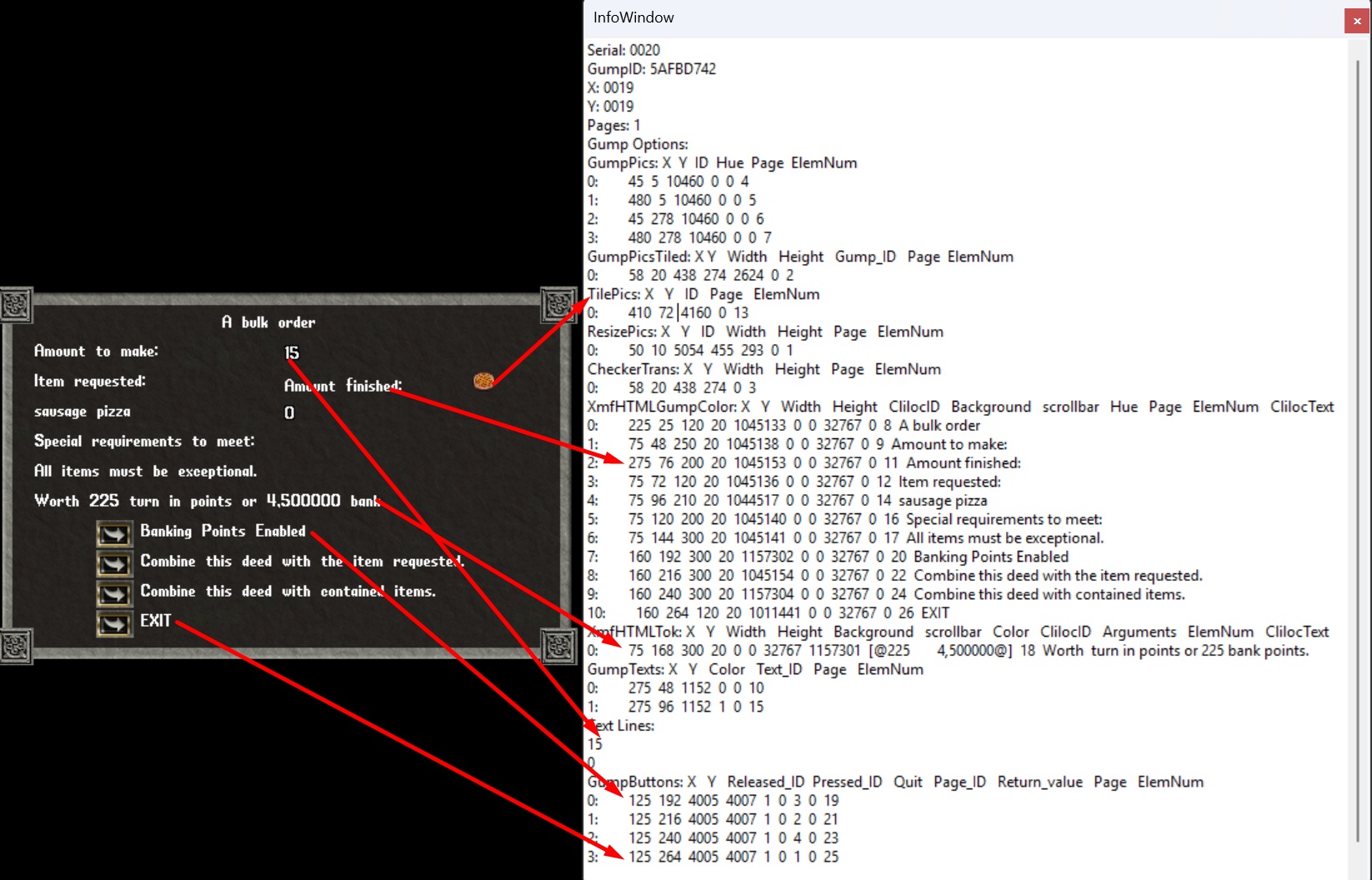
…and the same gump as your script sees it via GetGumpFullLines:
…и тот же гамп, каким его видит скрипт через GetGumpFullLines:
Serial: 0020
GumpID: 5AFBD742
X: 0019
Y: 0019
Pages: 1
Gump Options:
GumpPics: X  Y  ID  Hue  Page  ElemNum
0:        45  5  10460  0  0  4
1:        480  5  10460  0  0  5
2:        45  278  10460  0  0  6
3:        480  278  10460  0  0  7
GumpPicsTiled: X Y   Width   Height   Gump_ID   Page  ElemNum
0:        58  20  438  274  2624  0  2
TilePics: X   Y   ID   Page   ElemNum
0:        410  72  4160  0  13
ResizePics: X   Y   ID   Width   Height   Page   ElemNum
0:        50  10  5054  455  293  0  1
CheckerTrans: X   Y   Width   Height   Page   ElemNum
0:        58  20  438  274  0  3
XmfHTMLGumpColor: X   Y   Width   Height   ClilocID   Background   scrollbar   Hue   Page   ElemNum   ClilocText
0:        225  25  120  20  1045133  0  0  32767  0  8  A bulk order
1:        75  48  250  20  1045138  0  0  32767  0  9  Amount to make:
2:        275  76  200  20  1045153  0  0  32767  0  11  Amount finished:
3:        75  72  120  20  1045136  0  0  32767  0  12  Item requested:
4:        75  96  210  20  1044517  0  0  32767  0  14  sausage pizza
5:        75  120  200  20  1045140  0  0  32767  0  16  Special requirements to meet:
6:        75  144  300  20  1045141  0  0  32767  0  17  All items must be exceptional.
7:        160  192  300  20  1157302  0  0  32767  0  20  Banking Points Enabled
8:        160  216  300  20  1045154  0  0  32767  0  22  Combine this deed with the item requested.
9:        160  240  300  20  1157304  0  0  32767  0  24  Combine this deed with contained items.
10:        160  264  120  20  1011441  0  0  32767  0  26  EXIT
XmfHTMLTok: X   Y   Width   Height   Background   scrollbar   Color   ClilocID   Arguments   ElemNum   ClilocText
0:        75  168  300  20  0  0  32767  1157301  [@225	4,500000@]  18  Worth  turn in points or 225 bank points.
GumpTexts: X   Y   Color   Text_ID   Page   ElemNum
0:        275  48  1152  0  0  10
1:        275  96  1152  1  0  15
Text Lines:
15
0
GumpButtons: X   Y   Released_ID  Pressed_ID   Quit   Page_ID   Return_value   Page   ElemNum
0:        125  192  4005  4007  1  0  3  0  19
1:        125  216  4005  4007  1  0  2  0  21
2:        125  240  4005  4007  1  0  4  0  23
3:        125  264  4005  4007  1  0  1  0  25
How to read it / Как это читать:
- Most of the dump is decoration you ignore —
ResizePics(the frame),GumpPics(the four corner ornaments),GumpPicsTiled+CheckerTrans(the dark panel),TilePics(the pizza item art, id4160). None of them carry areturn_value. - Static labels are clilocs (
XmfHTMLGumpColor/XmfHTMLTok). Because UO data is loaded, the resolved text is shown in theClilocTextcolumn. TheXmfHTMLTokrow even shows argument substitution — cliloc1157301with arguments225and4,500000. - Dynamic values come from the Text Lines pool:
GumpTextsrow 0 →Text_ID 0→Text Lines[0]="15"(“Amount to make”); row 1 →Text_ID 1→Text Lines[1]="0"(“Amount finished”). The numbers aren’t stored in the element — they’re referenced from the pool. - The actionable part is
GumpButtons, and the lesson is right here: the four buttons haveReturn_values 3, 2, 4, 1 — not the visual top-to-bottom order. Match each button to its label by the sharedYcoordinate:
Button Y |
Label at the same Y |
Return_value |
Press with |
|---|---|---|---|
| 192 | Banking Points Enabled | 3 | NumGumpButton(idx, 3) |
| 216 | Combine this deed with the item requested | 2 | NumGumpButton(idx, 2) |
| 240 | Combine this deed with contained items | 4 | NumGumpButton(idx, 4) |
| 264 | EXIT | 1 | NumGumpButton(idx, 1) |
- Почти весь дамп — это оформление, которое можно игнорировать:
ResizePics(рамка),GumpPics(четыре угловых украшения),GumpPicsTiled+CheckerTrans(тёмная панель),TilePics(картинка предмета — пицца, id4160). Ни у одного из них нетreturn_value. - Статичные подписи — это клилоки (
XmfHTMLGumpColor/XmfHTMLTok). Так как данные UO загружены, расшифрованный текст показан в столбцеClilocText. В строкеXmfHTMLTokвидна и подстановка аргументов — клилок1157301с аргументами225и4,500000. - Динамические значения берутся из пула Text Lines:
GumpTextsстрока 0 →Text_ID 0→Text Lines[0]="15"(«Amount to make»); строка 1 →Text_ID 1→Text Lines[1]="0"(«Amount finished»). Числа не хранятся в самом элементе — они ссылаются на пул. - Действия — в
GumpButtons, и здесь главный урок: у четырёх кнопокReturn_valueравны 3, 2, 4, 1 — а не по порядку сверху вниз. Сопоставляйте кнопку с подписью по общей координатеY(см. таблицу выше).
The takeaway: never assume button order — always read Return_value from the dump. This gump has no checkboxes/radios/text entries, so you just press a button directly. To press EXIT:
Вывод: никогда не гадайте порядок кнопок — всегда берите Return_value из дампа. В этом гампе нет чекбоксов/радио/текстовых полей, поэтому кнопку нажимают напрямую. Чтобы нажать EXIT:
// idx = index of this gump (matched by GumpID $5AFBD742)
NumGumpButton(GetGumpsCount - 1, 1);   // EXIT (return_value 1)
NumGumpButton(GetGumpsCount() - 1, 1) # EXIT (return_value 1)
A server can also pop a small text-entry dialog (packet 0x9B) that looks like a gump but is a separate mechanism. It is delivered via the evGumpTextEntry event, and you respond with ConsoleEntryReply / ConsoleEntryUnicodeReply — not with the gump methods above.
Сервер может также показать маленький диалог ввода текста (пакет 0x9B), который выглядит как гамп, но является отдельным механизмом. Он приходит через событие evGumpTextEntry, а отвечают на него через ConsoleEntryReply / ConsoleEntryUnicodeReply — не методами гампов выше.
// PascalScript / DWScript
var
  idx: Integer;
begin
  idx := -1;
  // find the gump we expect by its GumpID
  if GetGumpsCount > 0 then
    for var i := GetGumpsCount - 1 downto 0 do
      if GetGumpID(i) = $1A2B3C4D then
      begin
        idx := i;
        Break;
      end;

  if idx >= 0 then
  begin
    NumGumpCheckBox(idx, 1001, 1);        // tick checkbox return_value 1001
    NumGumpTextEntry(idx, 3001, 'Vizit'); // fill text entry return_value 3001
    NumGumpButton(idx, 1);                // press OK (return_value 1) -> sends reply
    AddToSystemJournal('Gump answered');
  end
  else
    AddToSystemJournal('Target gump not found');
end.
idx = -1
for i in range(GetGumpsCount() - 1, -1, -1):
    if GetGumpID(i) == 0x1A2B3C4D:
        idx = i
        break

if idx >= 0:
    NumGumpCheckBox(idx, 1001, 1)          # tick checkbox 1001
    NumGumpTextEntry(idx, 3001, 'Vizit')   # fill text entry 3001
    NumGumpButton(idx, 1)                   # press OK -> sends reply
    AddToSystemJournal('Gump answered')
else:
    AddToSystemJournal('Target gump not found')
var
  i: Integer;
  Lines: TStringList;
begin
  // wait up to ~5s for any gump
  for i := 0 to 50 do
  begin
    if GetGumpsCount > 0 then Break;
    Wait(100);
  end;

  if GetGumpsCount > 0 then
  begin
    Lines := TStringList.Create;
    try
      GetGumpTextLines(GetGumpsCount - 1, Lines);
      for i := 0 to Lines.Count - 1 do
        AddToSystemJournal('Line ' + IntToStr(i) + ': ' + Lines[i]);
    finally
      Lines.Free;
    end;
  end;
end.
for _ in range(50):
    if GetGumpsCount() > 0:
        break
    Wait(100)

if GetGumpsCount() > 0:
    lines = GetGumpTextLines(GetGumpsCount() - 1)
    for i, line in enumerate(lines):
        AddToSystemJournal(f'Line {i}: {line}')
procedure OnGump(Serial, GumpID: Cardinal; X, Y: Integer);
begin
  AddToSystemJournal(Format('Gump arrived: ID=$%x Serial=$%x', [GumpID, Serial]));
  // do NOT answer the gump here — flag it and handle it in the main loop
end;

begin
  SetEventProc(evIncomingGump, 'OnGump');
  while True do
    Wait(50);
end.
from py_astealth.stealth_enums import EventType

def on_gump(serial, gump_id, x, y):
    AddToSystemJournal(f'Gump arrived: ID={gump_id:08X} Serial={serial:08X}')
    # flag it; answer it from the main loop, not here

SetEventProc(EventType.EvIncomingGump, on_gump)
while True:
    Wait(50)
var
  i: Integer;
begin
  for i := GetGumpsCount - 1 downto 0 do
    if IsGumpCanBeClosed(i) then
      CloseSimpleGump(i);
end.
for i in range(GetGumpsCount() - 1, -1, -1):
    if IsGumpCanBeClosed(i):
        CloseSimpleGump(i)
| Category | Methods |
|---|---|
| Detect | IsGump, GetGumpsCount |
| Identify | GetGumpID, GetGumpSerial |
| Read | GetGumpInfo, GetGumpTextLines, GetGumpShortLines, GetGumpFullLines, GetGumpButtonsDescription |
| Interact (by index) | NumGumpButton, NumGumpCheckBox, NumGumpRadiobutton, NumGumpTextEntry |
| Interact (hooks) | GumpAutoCheckBox, GumpAutoRadiobutton, GumpAutoTextEntry, WaitGump (deprecated) |
| Close | CloseSimpleGump, IsGumpCanBeClosed, CloseClientGump, CloseClientUIWindow |
| Ignore | AddGumpIgnoreByID, AddGumpIgnoreBySerial, ClearGumpsIgnore |
| Special | ReqVirtuesGump |
| Events | evIncomingGump, evGumpTextEntry |